# ollama-web
A lightweight personal web UI for Ollama that runs directly on your machine — no Docker or virtual machine required.
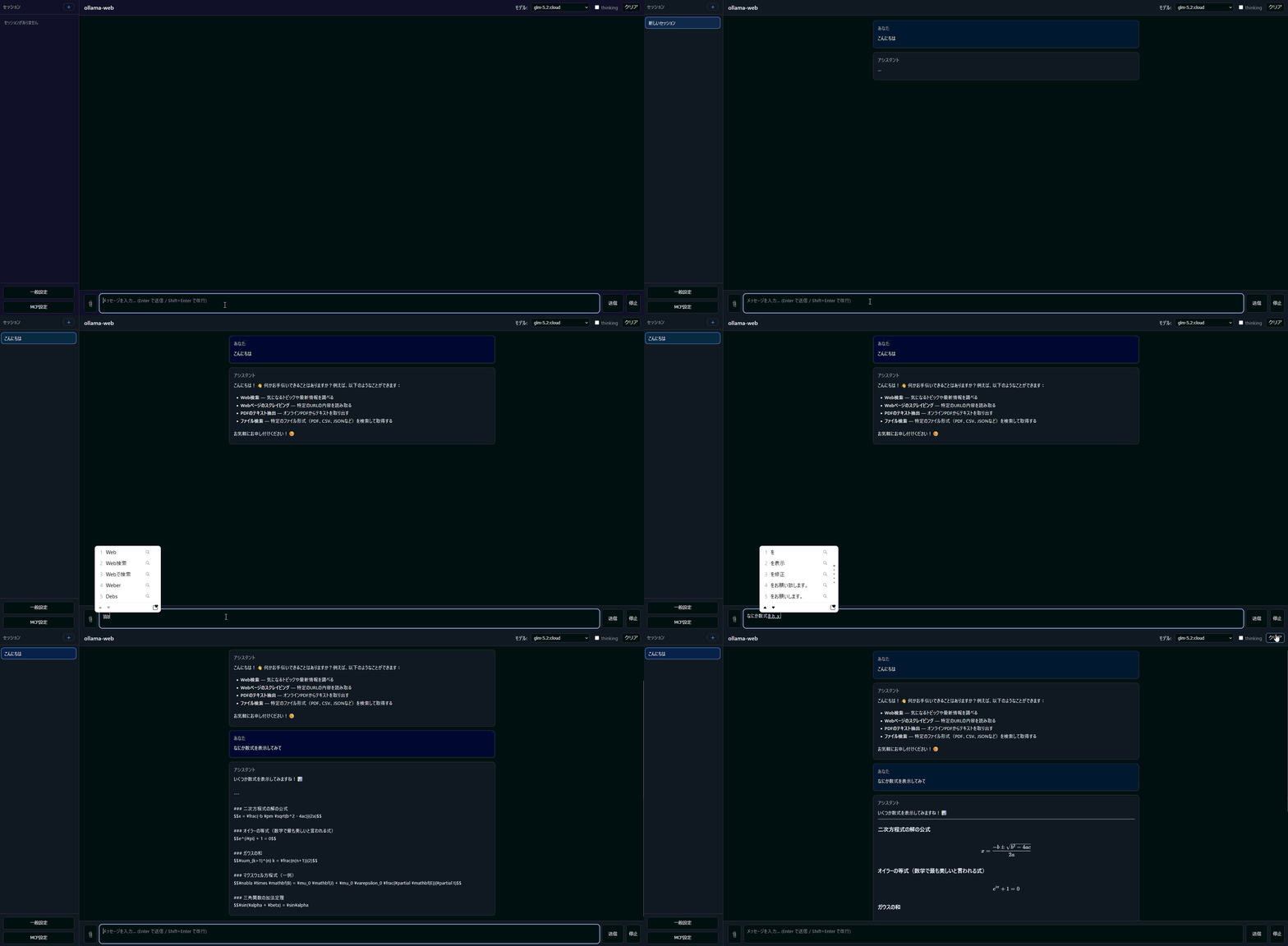
Use Ollama from your browser with streaming chat, web search and URL fetching, image, file, and PDF attachments, and MCP tool calling. It is designed for personal use when you want these capabilities in a small host-OS setup without deploying a large, complex AI platform.
## Highlights
- Streaming chat with Ollama models
- Web search and URL fetching
- Image, file, and PDF attachments
- MCP tools via stdio and Streamable HTTP
- Runs directly on the host OS — no Docker or VM required
- Local conversation and attachment storage
- PIN authentication, CSRF protection, CSP, and SSRF protection
- Japanese and English UI
## Requirements
- Python 3.10+
- Ollama must be running
- `uv` recommended
By default, the Ollama API is accessed at `http://127.0.0.1:11434`.
## Installation
```bash
uv venv .venv
uv pip install -e ".[dev]" -p .venv
```
To install only production dependencies:
```bash
uv venv .venv
uv pip install -e . -p .venv
```
## Usage
For local PC use only:
```bash
ollama-web
```
If `OLLAMA_WEB_PIN` is not set, a random PIN will be printed to the console on startup. Open `http://127.0.0.1:8000` in your browser and log in with that PIN.
To access from another device on the LAN, such as a smartphone:
```bash
OLLAMA_WEB_PIN=123456 OLLAMA_WEB_HOST=0.0.0.0 ollama-web
```
In PowerShell, set the variables as follows:
```powershell
$env:OLLAMA_WEB_PIN = "123456"
$env:OLLAMA_WEB_HOST = "0.0.0.0"
ollama-web
```
## Configuration
| Environment variable | Default | Description |
| --- | --- | --- |
| `OLLAMA_HOST` | `http://127.0.0.1:11434` | Target Ollama API |
| `OLLAMA_WEB_MODEL` | `llama3.2` | Default model to select |
| `OLLAMA_WEB_HOST` | `127.0.0.1` | Host the web UI listens on |
| `OLLAMA_WEB_PORT` | `8000` | Port the web UI listens on |
| `OLLAMA_WEB_DATA_DIR` | `data` | Directory for sessions and attachments |
| `OLLAMA_WEB_MAX_UPLOAD_MB` | `20` | Maximum upload file size in MB |
| `OLLAMA_WEB_PIN` | Generated automatically on startup | PIN for login |
| `OLLAMA_WEB_SECRET_KEY` | Generated automatically on startup | Cookie signing key |
| `OLLAMA_WEB_ALLOWED_ORIGINS` | Not set | Comma-separated list of allowed CORS origins |
| `OLLAMA_WEB_MCP_STDIO_ALLOWLIST` | Not set | Comma-separated absolute paths of executable files allowed for stdio MCP |
| `OLLAMA_WEB_MCP_HTTPS_ALLOWLIST` | Not set | Comma-separated hostnames allowed for remote HTTPS MCP connections |
| `OLLAMA_WEB_LANGUAGE` | `ja` | Display language for the UI and LLM prompts (`ja` or `en`) |
| `OLLAMA_WEB_SEARCH_REGION` | `auto` | Search region: `auto`, `us-en`, or `jp-jp`. Auto selects Japan for queries containing kana, otherwise the US. |
Search uses ddgs with `backend="auto"`. Region is selected internally; the LLM tool
still accepts only `query` and `max_results`. Detection normalizes half-width kana
and ignores URLs and `site:`/`filetype:` tokens, without rewriting the search query.
Kanji-only queries use `us-en`; set `jp-jp` to prefer Japan for every query. This
setting is independent of the UI language and takes effect after restarting the app.
Invalid values stop startup with a configuration error.
Search summaries omit malformed URLs and known Bing ad links, and represent missing
or URL-only titles as an empty string while keeping the URL and snippet. Filtering
can reduce the result count; it does not trigger extra requests. Provider failures
remain tool errors.
### Multilingual Support
UI text and LLM prompts are managed by JSON files in `src/ollama_web/i18n/messages/` and `src/ollama_web/prompts/`, respectively. The default is Japanese (`ja`). To add a new language, create `{lang}.json` in the same directories and set `OLLAMA_WEB_LANGUAGE` to that language code.
### General Settings
You can change the display language, system prompt, and Ollama generation options from "General Settings" at the bottom of the left pane in the browser. Settings are saved to `OLLAMA_WEB_DATA_DIR/settings.json` and shared across all sessions that use this data directory.
The saved display language takes precedence over `OLLAMA_WEB_LANGUAGE`. The system prompt is appended after the built-in tool prompt. Empty detailed options and the random seed in random mode are not sent to Ollama.
### MCP Server Configuration
MCP server connections are described in `data/mcpServers.json`. You can also edit and save them from "MCP Settings" at the bottom of the left pane in the browser.
MCP is a feature that exposes tools from external programs or external servers to the LLM. For security, there are restrictions on which servers can be registered and which tools can be executed automatically.
#### Using stdio MCP
stdio MCP cannot be started by default. Register the absolute path of the executable specified in `command` in `OLLAMA_WEB_MCP_STDIO_ALLOWLIST` first.
PowerShell example:
```powershell
$env:OLLAMA_WEB_MCP_STDIO_ALLOWLIST = "C:\Users\you\src\python\ollama-web\.venv\Scripts\python.exe"
ollama-web
```
Example `mcpServers.json`:
```json
{
"mcpServers": {
"calc": {
"command": "C:\\Users\\you\\src\\python\\ollama-web\\.venv\\Scripts\\python.exe",
"args": ["scripts/calc_server.py"]
}
}
}
```
What should be allowed in `OLLAMA_WEB_MCP_STDIO_ALLOWLIST` is the executable in `command`, not the script passed in `args`. For example, when launching `scripts/my_server.py` with `python.exe`, register the absolute path of `python.exe` in the allowlist.
When `cwd` is not specified, the working directory is the path from which ollama-web was launched.
#### Using Streamable HTTP MCP
Local HTTP MCP is allowed only for `http://127.0.0.1` or `http://localhost`.
```json
{
"mcpServers": {
"remote_calc": {
"url": "http://127.0.0.1:9000/mcp",
"headers": {
"Authorization": "Bearer optional-token"
},
"timeout": 30
}
}
}
```
For remote HTTPS MCP, register the destination hostname in `OLLAMA_WEB_MCP_HTTPS_ALLOWLIST`.
```powershell
$env:OLLAMA_WEB_MCP_HTTPS_ALLOWLIST = "mcp.example.com"
ollama-web
```
```json
{
"mcpServers": {
"remote_calc": {
"url": "https://mcp.example.com/mcp",
"headers": {
"Authorization": "Bearer optional-token"
}
}
}
}
```
Plain HTTP remote servers, private IPs, and metadata IPs are rejected.
#### MCP Tool Names and Handling of Secrets
Server names and tool names may only contain alphanumeric characters, `_`, and `-`. `__` is reserved as an internal namespace separator and cannot be used.
In GET responses from the MCP settings API, secret-like values in `env` / `headers` are masked as `***`. Tool execution results and errors are also quarantined as untrusted data before being passed to the LLM.
When an MCP tool returns an image or audio item, its base64 payload is separated from the text result, checked against size and MIME allowlists, and stored in the session. Images are sent only to models that explicitly advertise vision support; other models receive a fixed localized notice. Audio bytes are never sent to Ollama, regardless of model capabilities, and are played in the chat through a same-origin URL and an `
 ## Highlights
- Streaming chat with Ollama models
- Web search and URL fetching
- Image, file, and PDF attachments
- MCP tools via stdio and Streamable HTTP
- Runs directly on the host OS — no Docker or VM required
- Local conversation and attachment storage
- PIN authentication, CSRF protection, CSP, and SSRF protection
- Japanese and English UI
## Requirements
- Python 3.10+
- Ollama must be running
- `uv` recommended
By default, the Ollama API is accessed at `http://127.0.0.1:11434`.
## Installation
```bash
uv venv .venv
uv pip install -e ".[dev]" -p .venv
```
To install only production dependencies:
```bash
uv venv .venv
uv pip install -e . -p .venv
```
## Usage
For local PC use only:
```bash
ollama-web
```
If `OLLAMA_WEB_PIN` is not set, a random PIN will be printed to the console on startup. Open `http://127.0.0.1:8000` in your browser and log in with that PIN.
To access from another device on the LAN, such as a smartphone:
```bash
OLLAMA_WEB_PIN=123456 OLLAMA_WEB_HOST=0.0.0.0 ollama-web
```
In PowerShell, set the variables as follows:
```powershell
$env:OLLAMA_WEB_PIN = "123456"
$env:OLLAMA_WEB_HOST = "0.0.0.0"
ollama-web
```
## Configuration
| Environment variable | Default | Description |
| --- | --- | --- |
| `OLLAMA_HOST` | `http://127.0.0.1:11434` | Target Ollama API |
| `OLLAMA_WEB_MODEL` | `llama3.2` | Default model to select |
| `OLLAMA_WEB_HOST` | `127.0.0.1` | Host the web UI listens on |
| `OLLAMA_WEB_PORT` | `8000` | Port the web UI listens on |
| `OLLAMA_WEB_DATA_DIR` | `data` | Directory for sessions and attachments |
| `OLLAMA_WEB_MAX_UPLOAD_MB` | `20` | Maximum upload file size in MB |
| `OLLAMA_WEB_PIN` | Generated automatically on startup | PIN for login |
| `OLLAMA_WEB_SECRET_KEY` | Generated automatically on startup | Cookie signing key |
| `OLLAMA_WEB_ALLOWED_ORIGINS` | Not set | Comma-separated list of allowed CORS origins |
| `OLLAMA_WEB_MCP_STDIO_ALLOWLIST` | Not set | Comma-separated absolute paths of executable files allowed for stdio MCP |
| `OLLAMA_WEB_MCP_HTTPS_ALLOWLIST` | Not set | Comma-separated hostnames allowed for remote HTTPS MCP connections |
| `OLLAMA_WEB_LANGUAGE` | `ja` | Display language for the UI and LLM prompts (`ja` or `en`) |
| `OLLAMA_WEB_SEARCH_REGION` | `auto` | Search region: `auto`, `us-en`, or `jp-jp`. Auto selects Japan for queries containing kana, otherwise the US. |
Search uses ddgs with `backend="auto"`. Region is selected internally; the LLM tool
still accepts only `query` and `max_results`. Detection normalizes half-width kana
and ignores URLs and `site:`/`filetype:` tokens, without rewriting the search query.
Kanji-only queries use `us-en`; set `jp-jp` to prefer Japan for every query. This
setting is independent of the UI language and takes effect after restarting the app.
Invalid values stop startup with a configuration error.
Search summaries omit malformed URLs and known Bing ad links, and represent missing
or URL-only titles as an empty string while keeping the URL and snippet. Filtering
can reduce the result count; it does not trigger extra requests. Provider failures
remain tool errors.
### Multilingual Support
UI text and LLM prompts are managed by JSON files in `src/ollama_web/i18n/messages/` and `src/ollama_web/prompts/`, respectively. The default is Japanese (`ja`). To add a new language, create `{lang}.json` in the same directories and set `OLLAMA_WEB_LANGUAGE` to that language code.
### General Settings
You can change the display language, system prompt, and Ollama generation options from "General Settings" at the bottom of the left pane in the browser. Settings are saved to `OLLAMA_WEB_DATA_DIR/settings.json` and shared across all sessions that use this data directory.
The saved display language takes precedence over `OLLAMA_WEB_LANGUAGE`. The system prompt is appended after the built-in tool prompt. Empty detailed options and the random seed in random mode are not sent to Ollama.
### MCP Server Configuration
MCP server connections are described in `data/mcpServers.json`. You can also edit and save them from "MCP Settings" at the bottom of the left pane in the browser.
MCP is a feature that exposes tools from external programs or external servers to the LLM. For security, there are restrictions on which servers can be registered and which tools can be executed automatically.
#### Using stdio MCP
stdio MCP cannot be started by default. Register the absolute path of the executable specified in `command` in `OLLAMA_WEB_MCP_STDIO_ALLOWLIST` first.
PowerShell example:
```powershell
$env:OLLAMA_WEB_MCP_STDIO_ALLOWLIST = "C:\Users\you\src\python\ollama-web\.venv\Scripts\python.exe"
ollama-web
```
Example `mcpServers.json`:
```json
{
"mcpServers": {
"calc": {
"command": "C:\\Users\\you\\src\\python\\ollama-web\\.venv\\Scripts\\python.exe",
"args": ["scripts/calc_server.py"]
}
}
}
```
What should be allowed in `OLLAMA_WEB_MCP_STDIO_ALLOWLIST` is the executable in `command`, not the script passed in `args`. For example, when launching `scripts/my_server.py` with `python.exe`, register the absolute path of `python.exe` in the allowlist.
When `cwd` is not specified, the working directory is the path from which ollama-web was launched.
#### Using Streamable HTTP MCP
Local HTTP MCP is allowed only for `http://127.0.0.1` or `http://localhost`.
```json
{
"mcpServers": {
"remote_calc": {
"url": "http://127.0.0.1:9000/mcp",
"headers": {
"Authorization": "Bearer optional-token"
},
"timeout": 30
}
}
}
```
For remote HTTPS MCP, register the destination hostname in `OLLAMA_WEB_MCP_HTTPS_ALLOWLIST`.
```powershell
$env:OLLAMA_WEB_MCP_HTTPS_ALLOWLIST = "mcp.example.com"
ollama-web
```
```json
{
"mcpServers": {
"remote_calc": {
"url": "https://mcp.example.com/mcp",
"headers": {
"Authorization": "Bearer optional-token"
}
}
}
}
```
Plain HTTP remote servers, private IPs, and metadata IPs are rejected.
#### MCP Tool Names and Handling of Secrets
Server names and tool names may only contain alphanumeric characters, `_`, and `-`. `__` is reserved as an internal namespace separator and cannot be used.
In GET responses from the MCP settings API, secret-like values in `env` / `headers` are masked as `***`. Tool execution results and errors are also quarantined as untrusted data before being passed to the LLM.
When an MCP tool returns an image or audio item, its base64 payload is separated from the text result, checked against size and MIME allowlists, and stored in the session. Images are sent only to models that explicitly advertise vision support; other models receive a fixed localized notice. Audio bytes are never sent to Ollama, regardless of model capabilities, and are played in the chat through a same-origin URL and an `
## Highlights
- Streaming chat with Ollama models
- Web search and URL fetching
- Image, file, and PDF attachments
- MCP tools via stdio and Streamable HTTP
- Runs directly on the host OS — no Docker or VM required
- Local conversation and attachment storage
- PIN authentication, CSRF protection, CSP, and SSRF protection
- Japanese and English UI
## Requirements
- Python 3.10+
- Ollama must be running
- `uv` recommended
By default, the Ollama API is accessed at `http://127.0.0.1:11434`.
## Installation
```bash
uv venv .venv
uv pip install -e ".[dev]" -p .venv
```
To install only production dependencies:
```bash
uv venv .venv
uv pip install -e . -p .venv
```
## Usage
For local PC use only:
```bash
ollama-web
```
If `OLLAMA_WEB_PIN` is not set, a random PIN will be printed to the console on startup. Open `http://127.0.0.1:8000` in your browser and log in with that PIN.
To access from another device on the LAN, such as a smartphone:
```bash
OLLAMA_WEB_PIN=123456 OLLAMA_WEB_HOST=0.0.0.0 ollama-web
```
In PowerShell, set the variables as follows:
```powershell
$env:OLLAMA_WEB_PIN = "123456"
$env:OLLAMA_WEB_HOST = "0.0.0.0"
ollama-web
```
## Configuration
| Environment variable | Default | Description |
| --- | --- | --- |
| `OLLAMA_HOST` | `http://127.0.0.1:11434` | Target Ollama API |
| `OLLAMA_WEB_MODEL` | `llama3.2` | Default model to select |
| `OLLAMA_WEB_HOST` | `127.0.0.1` | Host the web UI listens on |
| `OLLAMA_WEB_PORT` | `8000` | Port the web UI listens on |
| `OLLAMA_WEB_DATA_DIR` | `data` | Directory for sessions and attachments |
| `OLLAMA_WEB_MAX_UPLOAD_MB` | `20` | Maximum upload file size in MB |
| `OLLAMA_WEB_PIN` | Generated automatically on startup | PIN for login |
| `OLLAMA_WEB_SECRET_KEY` | Generated automatically on startup | Cookie signing key |
| `OLLAMA_WEB_ALLOWED_ORIGINS` | Not set | Comma-separated list of allowed CORS origins |
| `OLLAMA_WEB_MCP_STDIO_ALLOWLIST` | Not set | Comma-separated absolute paths of executable files allowed for stdio MCP |
| `OLLAMA_WEB_MCP_HTTPS_ALLOWLIST` | Not set | Comma-separated hostnames allowed for remote HTTPS MCP connections |
| `OLLAMA_WEB_LANGUAGE` | `ja` | Display language for the UI and LLM prompts (`ja` or `en`) |
| `OLLAMA_WEB_SEARCH_REGION` | `auto` | Search region: `auto`, `us-en`, or `jp-jp`. Auto selects Japan for queries containing kana, otherwise the US. |
Search uses ddgs with `backend="auto"`. Region is selected internally; the LLM tool
still accepts only `query` and `max_results`. Detection normalizes half-width kana
and ignores URLs and `site:`/`filetype:` tokens, without rewriting the search query.
Kanji-only queries use `us-en`; set `jp-jp` to prefer Japan for every query. This
setting is independent of the UI language and takes effect after restarting the app.
Invalid values stop startup with a configuration error.
Search summaries omit malformed URLs and known Bing ad links, and represent missing
or URL-only titles as an empty string while keeping the URL and snippet. Filtering
can reduce the result count; it does not trigger extra requests. Provider failures
remain tool errors.
### Multilingual Support
UI text and LLM prompts are managed by JSON files in `src/ollama_web/i18n/messages/` and `src/ollama_web/prompts/`, respectively. The default is Japanese (`ja`). To add a new language, create `{lang}.json` in the same directories and set `OLLAMA_WEB_LANGUAGE` to that language code.
### General Settings
You can change the display language, system prompt, and Ollama generation options from "General Settings" at the bottom of the left pane in the browser. Settings are saved to `OLLAMA_WEB_DATA_DIR/settings.json` and shared across all sessions that use this data directory.
The saved display language takes precedence over `OLLAMA_WEB_LANGUAGE`. The system prompt is appended after the built-in tool prompt. Empty detailed options and the random seed in random mode are not sent to Ollama.
### MCP Server Configuration
MCP server connections are described in `data/mcpServers.json`. You can also edit and save them from "MCP Settings" at the bottom of the left pane in the browser.
MCP is a feature that exposes tools from external programs or external servers to the LLM. For security, there are restrictions on which servers can be registered and which tools can be executed automatically.
#### Using stdio MCP
stdio MCP cannot be started by default. Register the absolute path of the executable specified in `command` in `OLLAMA_WEB_MCP_STDIO_ALLOWLIST` first.
PowerShell example:
```powershell
$env:OLLAMA_WEB_MCP_STDIO_ALLOWLIST = "C:\Users\you\src\python\ollama-web\.venv\Scripts\python.exe"
ollama-web
```
Example `mcpServers.json`:
```json
{
"mcpServers": {
"calc": {
"command": "C:\\Users\\you\\src\\python\\ollama-web\\.venv\\Scripts\\python.exe",
"args": ["scripts/calc_server.py"]
}
}
}
```
What should be allowed in `OLLAMA_WEB_MCP_STDIO_ALLOWLIST` is the executable in `command`, not the script passed in `args`. For example, when launching `scripts/my_server.py` with `python.exe`, register the absolute path of `python.exe` in the allowlist.
When `cwd` is not specified, the working directory is the path from which ollama-web was launched.
#### Using Streamable HTTP MCP
Local HTTP MCP is allowed only for `http://127.0.0.1` or `http://localhost`.
```json
{
"mcpServers": {
"remote_calc": {
"url": "http://127.0.0.1:9000/mcp",
"headers": {
"Authorization": "Bearer optional-token"
},
"timeout": 30
}
}
}
```
For remote HTTPS MCP, register the destination hostname in `OLLAMA_WEB_MCP_HTTPS_ALLOWLIST`.
```powershell
$env:OLLAMA_WEB_MCP_HTTPS_ALLOWLIST = "mcp.example.com"
ollama-web
```
```json
{
"mcpServers": {
"remote_calc": {
"url": "https://mcp.example.com/mcp",
"headers": {
"Authorization": "Bearer optional-token"
}
}
}
}
```
Plain HTTP remote servers, private IPs, and metadata IPs are rejected.
#### MCP Tool Names and Handling of Secrets
Server names and tool names may only contain alphanumeric characters, `_`, and `-`. `__` is reserved as an internal namespace separator and cannot be used.
In GET responses from the MCP settings API, secret-like values in `env` / `headers` are masked as `***`. Tool execution results and errors are also quarantined as untrusted data before being passed to the LLM.
When an MCP tool returns an image or audio item, its base64 payload is separated from the text result, checked against size and MIME allowlists, and stored in the session. Images are sent only to models that explicitly advertise vision support; other models receive a fixed localized notice. Audio bytes are never sent to Ollama, regardless of model capabilities, and are played in the chat through a same-origin URL and an `